 PmaControl
Replication Lag, the Silent Plague
Every DBA has lived through this moment: monitoring shows 300 seconds of lag on the replica, alerts are firing, and the question is always the same — why?
Seconds_Behind_Master (or Seconds_Behind_Source in MySQL 8) is a binary indicator: it lags or it doesn't. It says nothing about the cause. Is it a massive DELETE batch? A lack of parallelism? An 800 KB transaction blocking the SQL thread? To find out, you need SSH access to the master, the right mysqlbinlog binary, time, and a lot of grep.
PmaControl now automates all of that.
The New Feature: Binlog Analysis
How It Works
From the slave/show page of any replica, you can now:
- Select a time range directly on the lag chart (click and drag) or via datetime fields
- Launch the analysis with one click — everything runs in the background
- Watch real-time progress step by step
- View the full report with interactive charts and detailed metrics
- Receive a Telegram notification with the summary
What Happens Behind the Scenes
When you launch an analysis, PmaControl executes a 15-phase pipeline:
[21:15:02] ✓ init — Analysis #42 — slave=85 master=106 range=[20:27:51 → 20:29:27]
[21:15:02] ✓ master_info — Master: prod-db-01 — 10.68.68.106:3306
[21:15:02] ✓ version — Version: 8.0.44
[21:15:02] ✓ binary — Using: mysqlbinlog-8.0 — Ver 8.0.42
[21:15:03] ✓ credentials — MySQL user: pmacontrol@10.68.68.106:3306
[21:15:04] ✓ find_binlogs — Found 1 binlog file(s): mysql-bin.046508
[21:15:18] ✓ fetch — Fetched mysql-bin.046508 — 101.0 MB (via --read-from-remote-server, cached)
[21:15:19] ✓ file_ranges — 1 file(s) probed
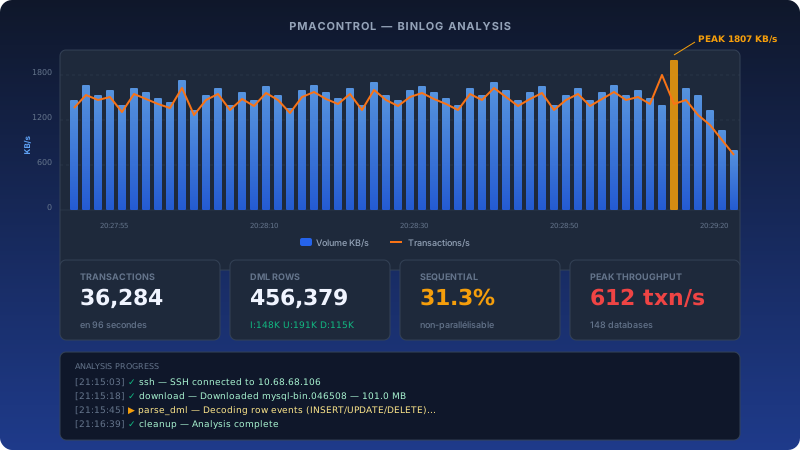
[21:15:45] ✓ parse_gtid — Parsed 36284 transactions, total 97.2 MB, 123 >100KB, 3 >500KB
[21:16:12] ✓ parse_dml — I:148,659 U:191,867 D:115,853 = 456,379 rows across 148 databases
[21:16:38] ✓ parse_volume — 97 seconds of data, peak 612 txn/s, peak 1807 KB/s
[21:16:39] ✓ parse_ddl — No DDL — 100% DML row-based
[21:16:39] ✓ metadata — 1 metadata file(s) written
[21:16:39] ✓ store — Report stored successfully
[21:16:39] ✓ cleanup — Cleanup done — analysis complete
Each step is visible in real-time in the UI, with full detail of what's happening. No more guessing whether the transfer is in progress or the parsing is stuck. Note: fetching uses the MySQL protocol (--read-from-remote-server), not SSH — no key to deploy on the master.
The Right Binary for the Right Version
A classic pitfall: using a MariaDB mysqlbinlog to read a MySQL 8 binlog, or vice-versa. Events are marked "Ignorable" and row-based data becomes unreadable.
PmaControl ships 8 static mysqlbinlog binaries (x86_64 and aarch64):
| Binary | Versions Covered |
|---|---|
mysqlbinlog-5.6 |
MySQL 5.5, 5.6, Percona 5.6 |
mysqlbinlog-5.7 |
MySQL 5.7, Percona 5.7 |
mysqlbinlog-8.0 |
MySQL 8.0 |
mysqlbinlog-8.4 |
MySQL 8.4 LTS |
mysqlbinlog-9.7 |
MySQL 9.7 LTS |
mysqlbinlog-mariadb |
MariaDB 10.x, 11.x, 12.x (generic fallback) |
The selection is automatic: PmaControl reads the version variable from the master's metrics and picks the closest compatible binary (see MysqlbinlogBinaryResolver). For MySQL Oracle, the strategy is to pick the lowest version ≥ the master's (forward compatibility is more reliable than backward). For MariaDB, the resolver also supports more specific binaries named mysqlbinlog-mariadb-10.11, mysqlbinlog-mariadb-11.8, etc. — deployed on demand when a host exposes a binlog format specific to its minor.
The Analysis Report
Volume Per Second Chart
The main chart shows two overlaid series:
- Blue bars: volume in KB/s (sum of
transaction_lengthper second) - Orange line: transactions per second
This is the DBA's first reflex: is the lag from a one-off spike or sustained throughput? The chart answers immediately.
MTS Parallelism Metrics
This is where the analysis becomes truly valuable. PmaControl parses the last_committed and sequence_number fields from each GTID event to compute:
- % of sequential transactions — those where
sequence_number = last_committed + 1, which cannot be parallelized by the Multi-Threaded Slave - Maximum parallelism group size — how many transactions can actually run concurrently
- Group distribution — how many groups of 1, 2, 3... transactions
Concrete example: if 31% of transactions are sequential and the max parallelism is 7, then even with 16 replica_parallel_workers, most will sit idle. The recommendation is clear: enable binlog_transaction_dependency_tracking = WRITESET on the master.
Large Transaction Detection
Large transactions are the #1 replication killer. A single 834 KB transaction touching 6,171 rows blocks the SQL applier thread for its entire duration — all other transactions queue up behind it.
PmaControl counts:
- Transactions > 100 KB
- Transactions > 500 KB
- The largest transaction (with its content: which tables, how many rows)
Top Tables
The report lists the 30 most modified tables with INSERT/UPDATE/DELETE breakdown. This is often where you find the toxic pattern: batches that DELETE FROM table WHERE ...; INSERT INTO table ... to "refresh" data instead of using INSERT ... ON DUPLICATE KEY UPDATE or smaller transactions.
Automatic Recommendations
Based on the metrics, PmaControl generates concrete recommendations:
- "Sequential transaction ratio is 31.3%. Consider
binlog_transaction_dependency_tracking = WRITESET." - "3 transaction(s) > 500 KB. Large transactions block the SQL applier thread."
- "148 databases modified. Multi-tenant pattern may cause replication hot-spots."
These aren't generic advice — they're computed from the actual data in your binlogs.
Telegram Notification
When the analysis completes, a summary is automatically sent via Telegram:
Binlog Analysis Complete
Slave: replica-prod-01
Master: master-prod-01 (8.0.44)
Range: 2026-04-13 20:27:51 → 2026-04-13 20:29:27
━━━━━━━━━━━━━━━━━━━
Size: 101.0 MB | Txn: 36,284 | Duration: 96s
DML: I:148,659 U:191,867 D:115,853 = 456,379 rows
Peak: 612 txn/s | Avg: 378.0 txn/s
Sequential: 31.3% | Max parallel: 7
Large txn: 123 >100K, 3 >500K (max 815 KB)
Databases: 148
━━━━━━━━━━━━━━━━━━━
• High write throughput (peak 612 txn/s). Ensure replica_parallel_workers >= 8.
• Sequential transaction ratio is 31.3%. Consider WRITESET.
• 3 transaction(s) > 500 KB block the SQL applier thread.
The on-call DBA has everything they need to act, right in their pocket.
Technical Architecture
Binlog Retrieval: Like an IO Thread
PmaControl doesn't use SSH to fetch binlogs. It uses mysqlbinlog --read-from-remote-server which connects to the master via MySQL protocol, exactly like a replica's IO thread. PmaControl's existing MySQL credentials are enough — no SSH key required on the master.
mysqlbinlog --read-from-remote-server \
  --host=10.105.1.11 --port=3306 \
  --user=pmacontrol --password=*** \
  --raw --result-file=/tmp/analysis/ \
  mysql-bin.1054495
If PmaControl can connect to the master's MySQL (which it already does for monitoring), it can fetch the binlogs. No additional setup required.
Smart Binlog File Discovery
A production master can have thousands of binlog files (we encountered 2,712 files during development). Scanning each file to find the time range would be prohibitively slow.
The 2-step strategy:
-
Anchor from the slave's position — read
Master_Log_FilefromSHOW SLAVE STATUSto know the current binlog. Also querySHOW MASTER STATUSon the master to account for replication lag. This gives a narrow window instead of scanning all 2,712 files. -
Binary search — within this window, probe each file's first timestamp via
mysqlbinlog --stop-position=8192(reads only the FORMAT_DESCRIPTION header + first event). With binary search, finding the right file among 100 candidates takes only 7 probes instead of 100.
Result: binlog discovery on a master with 2,712 files takes 2 seconds instead of minutes.
Persistent cache + JSON sidecar for AI
Downloaded binlogs are stored under data/binlog_analysis/<master_id>/ with a 30-day TTL. Direct consequence: re-analyzing the same time range (or an adjacent range that hits the same files) is free network- and time-wise — you immediately get Cache hit: mysql-bin.046508.
For each cached binlog, PmaControl also writes a mysql-bin.046508.meta.json sidecar containing a structured summary: total transactions, MTS parallelism, top DML tables, DDL, peak txn/s. This JSON is designed to be consumed by an LLM agent (see the site's AI Agents page) that needs to reason about an incident without re-parsing the binlogs itself.
The 8 Static Binaries, and Why
PmaControl ships pre-compiled mysqlbinlog binaries for each major version. This comes from a technical lesson: an incompatible mysqlbinlog doesn't produce an error — it produces silently wrong results.
Real example: a MariaDB mysqlbinlog reading a MySQL 8.0 binlog marks row-based events as "Ignorable" and skips them. The transaction count drops from 36,284 to 0. No error is displayed.
mysqlbinlog 5.6/5.7 Bug: --raw Ignores --stop-datetime
A trap discovered during development: in --raw --read-from-remote-server mode, mysqlbinlog versions 5.6 and 5.7 silently ignore the --start-datetime and --stop-datetime options. Instead of stopping at the requested date, the process acts like an IO thread and waits forever for new events.
The solution in PmaControl: use --raw without time filters (downloads the complete file, then exits), and apply time-range filtering only during local parsing. A 120-second timeout per file is added as a safety net.
Asynchronous Pipeline with Real-Time Progress
The analysis runs in the background via Glial CLI (php App/Webroot/index.php slave runBinlogAnalysisCli <id>). The frontend polls status every 2 seconds, showing progress in a terminal-style display. The progress JSON field stores each of the 15 phases with timestamps.
Result Storage
Everything is persisted in the binlog_analysis table:
- Volume per second (JSON)
- Top tables (JSON)
- Parallelism distribution (JSON)
- Recommendations (JSON)
Results are accessible at any time from the analysis history.
Concrete Use Cases
"The replica lag at 3 AM"
Monitoring shows a lag spike at 3 AM. Next morning, the DBA selects the 02:55-03:10 range on the chart and launches the analysis. Result: a port_flux refresh batch that DELETEs + INSERTs 15,000 rows in a single transaction across 148 databases. Solution: split into 500-row transactions.
"Why won't the replica catch up?"
Lag keeps growing despite 8 parallel workers. The analysis shows 35% sequential transactions and a max parallelism of 5. Solution: enable WRITESET on the master and increase to 16 workers.
"What's the replication impact of this batch?"
Before running a migration batch in production, analyze a similar binlog from a staging environment to estimate replication impact.
How to Use It
- Open PmaControl → Slave → Show on your replica
- Click and drag on the lag chart to select a time range
- Click "Analyze Binlogs"
- Watch the steps unfold in real-time
- Review the report, check the recommendations
- Receive the summary on Telegram
That's it. No manual SSH, no mysqlbinlog | grep | awk | sort, no script to maintain. Replication lag diagnosis in one click.
Comments (0)
No comments yet.
Leave a comment